Changelog
What changed in Crowfly, newest first.
November 2026
Nov 9, link to this entry · Improved
Connected assistants get a request id with errors
When a connected AI assistant hits an internal error, the reply now carries a request id and says whether a retry is worth trying, so the assistant can tell you what to report.
Nov 9, link to this entry · Fixed
New customers are no longer sent back to pick another time
On booking pages with a returning-customer check, a new customer who typed their phone number at the contact step was sent back to the time step with no explanation. They now go on to review their booking.
Nov 9, link to this entry · Fixed
Clearing a booking's notes now saves
Clearing a booking's notes and saving used to fail. It now saves with the notes empty.
Nov 9, link to this entry · Fixed
Invoices go to the billing contact
Invoices, receipts and payment acknowledgments now go to the contact marked as the billing contact, and to the main contact when there is none. Texts still go to the main contact.
Tell your AI assistant how you like your days to run
Describe what a good day looks like to the AI assistant you have connected to Crowfly, and Crowfly applies it to the booking screen and to the times customers can pick.
Tell your AI assistant how you like your days to run: "keep Fridays free unless it's a quote visit", "new customers on weekday mornings", "keep 30 minutes free for lunch between 11 and 1", or "no more than 90 minutes of driving in a day". It turns each one into a scheduling rule, shows you what customers will see before anything is saved, and warns you if a rule would hide half of your open time.
The booking screen ranks times by your rules. Most convenient and First available each lead with one time and open to the five best, one per morning, afternoon or evening, so a customer who can't do Wednesday morning rules out one card. Pick a card and any other time in that half-day that scores as well appears as a chip. Every time, including the ones under Browse all open slots, shows its score, and a question mark explains which rules moved it. A time that breaks a rule is flagged but can still be booked. Your booking page follows the same rules: the recommended time respects them, and times a rule hides are not offered. If a rule depends on whether someone has booked with you before, the page asks returning customers for their mobile number first.
Your assistant can also change your jobs-per-day cap, your default time between jobs and your drive limits, showing each change before it saves. Your rules and those settings are listed in Settings, Scheduling rules, where a ready-made prompt walks a new assistant through how you already work.
A service, add-on or visit can be as short as one minute or as long as twelve hours, and if nobody on your team is set up for the service you pick, the booking screen says so and points you to the team page.
Nov 3, link to this entry · Improved
Find lapsed customers and update tasks in bulk from your AI assistant
The MCP server and API now filter customers and bookings by ZIP or city, show when each customer was last serviced, filter invoices by outstanding balance, and update many records in one confirmed call. You can also trim list results with fields and group bookings by customer in queries.
Ask your assistant for customers in a ZIP code who have not been serviced in a year and it can answer in one call, using the new ZIP and city filters and each customer's last service date.
Invoices filter by status and outstanding balance, and tasks filter by when they were created. The new bulk update tool changes many tasks, customers, leads or quotes with a single confirmation, so closing eight stale tasks no longer takes sixteen calls. Pass fields to trim long lists, and use the query description tool to see what each resource supports.
Nov 3, link to this entry · Fixed
Invite tasks clear when the customer signs up
When a customer signed up for a route day or declined it, the Invite task for them stayed open. It now clears with their answer, and when you enter a signup by hand the task is marked done, so Tasks only asks you to invite people who have not answered yet.
Nov 3, link to this entry · Fixed
Yes or no booking answers now show on the booking
A customer's answer to a yes or no booking question was charged correctly but saved blank, so the booking showed no answer. The answer is now kept and shown with the booking.
Nov 1, link to this entry · Improved
Explore the student and new business programs
Explore each discount program before signing up, with practical examples, eligibility, pricing, setup steps, and available help in one place.
October 2026
Student and new business discounts
Students and businesses in their first year can apply for half off their first six months of Standard or Pro. Apply when you sign up, or from Plan and billing while your trial is open or within 30 days of your first monthly payment. We confirm eligibility and the discount starts with your next invoice.
Pick the student or new business discount on the pricing page and the sign-up form asks one question: a school email for students, the month you started for new businesses. Already signed up? The same application is on Plan and billing while your trial is open, or for 30 days after your first monthly payment.
Once eligibility is confirmed, the discount comes off each invoice for six paid months, founder pricing included. On annual billing it comes off your first year all at once. Your plan page shows how many months are left.
Oct 28, link to this entry · Improved
Each quote shows when it was sent and opened
Every quote now reads, for example, Sent Wed · Opened Thu · check-in Sat, on the Quotes list and at the top of the quote. The Quotes list also has a Sent column. Quotes you haven't shared yet say Not sent yet.
Request a quote, with photos, from your booking page
Work that needs your eyes first now arrives as a lead instead of a booking. Customers describe the job, add photos and pick the days they are free, and you see it all in one inbox. It's in early access right now, so ask us and we'll switch it on for your account.
Mark a service as needs a quote and your booking page asks for the details you would otherwise get on a call: a few questions, a budget range if you want one, photos and the days the customer is free. They also get a Something else option for jobs you have not listed.
Each request lands in Leads with the photos, the free times and a one-tap text or call. When you are ready, write the quote from the lead or book the job straight onto the schedule. If a lead goes quiet, a task reminds you the day your quote is due.
Customers get a confirmation text with a link to add photos or new times until you quote. Leads are in beta, so ask us to turn them on for your account.
Oct 26, link to this entry · Improved
Photos on the Standard plan
Attach photos to quotes, invoices and bookings on the Standard plan. They used to be Pro only.
Oct 25, link to this entry · Improved
Service frequency tracks only what you've done at an address
An address now lists the services you have actually done there as tracked. Services it hasn't had yet sit under Not received yet, where you can still adjust them, and start tracking after their first visit.
Oct 25, link to this entry · Fixed
Maps load already framed
A map used to appear zoomed out and blurry for a moment, then zoom in on your stops. It now stays on Loading map until it is framed, and appears in place.
Oct 25, link to this entry · Improved
A legend button on every map
Every map now has a legend button under the zoom controls. It explains the symbols on the map you are looking at, and Show all lists every symbol Crowfly maps use.
Oct 25, link to this entry · Improved
Quote follow-ups for everyone
Quote follow-ups are scheduled the moment you share a quote and appear on the day they come due. The declined-quote rule is on for every account, and copying the link counts as sharing.
Oct 24, link to this entry · Improved
A clearer pin when adjusting a service address
Adjust pin now shows the service pin and the postal address with the same markers as the rest of Crowfly, with the distance between them in a chip on the map. Drag the pin, tap the map, or move it with the keyboard.
Oct 24, link to this entry · Improved
Clearer maps in the new booking flow
The address map and the day map in New booking now use the same markers as the rest of Crowfly. Booked stops show their start time, and the booking you are creating is marked with a dashed pin and its chosen time.
Oct 24, link to this entry · Improved
Route maps use the same markers as the rest of Crowfly
Route and campaign maps now show home base, numbered stops and the route line with the shared markers. On a route, tap a stop to see the customer and address.
Oct 24, link to this entry · Improved
Service area maps show who is in range
The map on a booking link's area settings and In range tab now uses the shared markers, names the centre of the area, and shows how many customers fall inside the radius. Tap a customer pin to see who it is.
Oct 24, link to this entry · Improved
Place your home base pin during sign-up
After you pick your business address at sign-up, a map shows where your day will start. If the pin lands on the wrong side of the lot or down the street, move it before you finish, and drive times start from where you park.
Oct 24, link to this entry · Improved
Today's map shows each stop's status
The map on Today now colours each stop by its status, marks the next visit in amber, shows start times under the stops, and opens a card for the visit you tap. It uses the same markers as every other map in Crowfly.
Quote follow-ups, in beta
Crowfly adds a follow-up task after you send a quote, moves it along up to three times, and closes it when the customer answers. You send every text yourself.
Tasks has its own page
Tasks now has its own page. See what is overdue, due today and later, hand a task to someone else, and put one off until a date with a note.
Oct 22, link to this entry · Fixed
Voice assistant bookings say where they came from
A booking made through the voice assistant now reads Voice assistant in the booking drawer, the Bookings by source report and the Customers source filter, instead of being counted as an online booking. It's in early access right now, so ask us and we'll switch it on for your account.
Oct 20, link to this entry · Improved
Address details open filled in, with the search box as the street line
Opening the detailed address fields on a saved address now fills them in from that address instead of starting blank, and the address box itself is the street line, so there is no second street field to retype. This applies wherever you type an address by hand, such as a booking or a customer's billing address.
Notes on every record
Leave notes on a customer, booking, quote, invoice, series or property. Each note shows who wrote it and when.
You can now add notes to a customer, booking, quote, invoice, recurring series or property. Each note shows who wrote it and when, so you can see the history at a glance.
Notes an assistant adds through your account connection are added alongside yours. They no longer overwrite what you wrote.
Zapier gets three new triggers: New Note, Note Updated and Note Deleted. Each one includes the note, the record it was left on and the customer's contact details.
Oct 20, link to this entry · Improved
Change a link's service area from the In range tab
A booking link's In range tab now has its own address and radius controls. Pick a new center or step the distance by half a mile and the map and customer list update to show who comes in and out, then save when it looks right. Before, changing either meant a trip to the link's Settings tab.
Oct 20, link to this entry · Improved
Your website embed code is now in Business profile
The code that puts your booking page on your own website moved from Booking links to Settings, under Business profile, beside your Google listing and the AI agents switch. Old links to the embed page take you there.
Oct 18, link to this entry · Improved
Drop a pin when you confirm an address
When Crowfly asks you to check an address Google could only approximate, you can now drop a pin on the map where the job really is.
If Google can only find a close match for an address, the check step now has a Drop a pin button. Move the pin to where you park or start the job, then save. Crowfly keeps the address as you typed it and uses the pin for drive times.
Move the pin when the map gets an address wrong
You can now drag an address's pin to the spot you actually drive to, like a back gate or a long driveway. Drive times and your maps use the pin from then on.
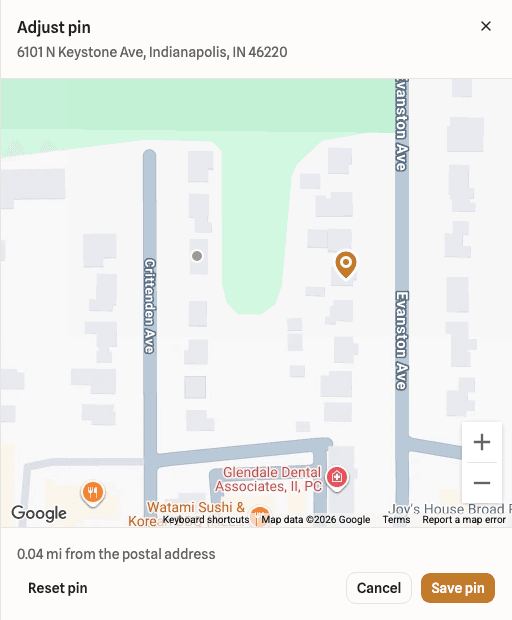
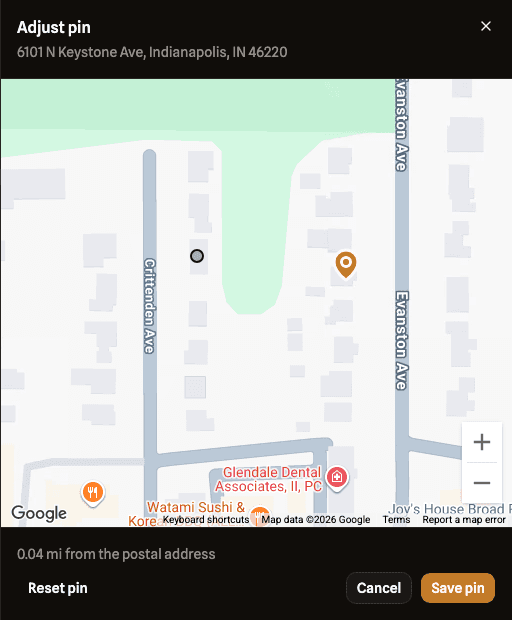
Drag the pin to the spot you drive to 1 of 3
Adjust pin opens a map of the address. Drag the pin, or tap the map, and you see how far it sits from the postal address. Drive times and your schedule map use the pin from then on, and pinned stops show a small pin badge on the map.
A pin more than half a mile from the address asks you to check it first. Choose Keep pin anyway if it is right. Reset pin puts it back on the address.
You can adjust the pin on a customer's property, on the address step of a new booking, on your home base in Settings, Service area, and on each crew member's home base.
Pinning a property only changes future work. Bookings you already made keep the point they were booked with.
Oct 17, link to this entry · Improved
Customers can move their pin on your booking page
After picking an address on your booking page, a customer can tap Not quite right? Adjust the pin and drag it to the spot you should drive to. Their booking uses the pin for drive times.
The pin is optional. A pin more than half a mile from the address asks the customer to check it first.
When an address the customer typed only has a close match, the booking page shows what they typed beside the closest match and lets them pick one.
Oct 17, link to this entry · Improved
Search opens in place on your phone
Tapping the search icon on a phone now opens the search box right in the header, with results filling the screen as you type. Close it and you are back where you were, instead of on a separate search page.
Oct 16, link to this entry · Improved
Add a unit to a quote's service address
You can now type a quote's service address by hand, including an apartment, suite or unit number.
One customer, more than one property
A customer can now have several service addresses. Every booking saves the property it was booked for, so a job at the lake house no longer overwrites the home address.
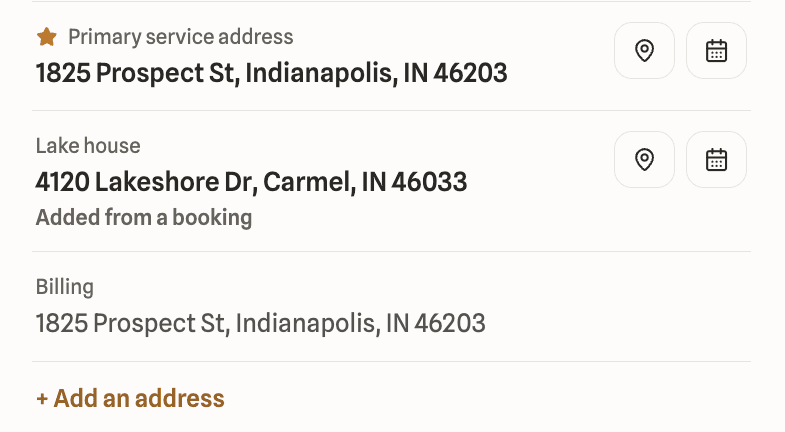
Whether a booking comes from your booking page, a quote, a dashboard booking or the API, the address on it is matched against the customer's existing properties. A new address becomes a new property on the customer's record, marked "Added from a booking", and the booking is linked to it. A known address links to the property already there.
Adding a customer by hand now warns you when the phone or email already belongs to someone in your list, so one household does not end up as two records.
Oct 14, link to this entry · Improved
Flexible visit times
Mark a service flexible and the route optimizer can move those visits to the best time on the day. Customers whose visit moves get one update afterwards.
Turn on "Time can move without asking the customer" for a service, or for one booking, and a route day with two or more movable visits can be optimized without any sign-ups. When you confirm the route, the moved visits get their new times and each customer gets one update. If no automatic update can reach a customer, for example when automatic updates are off and they have no email on file, you get a task to tell them, and the route page lists those customers until you mark each one done.
Recurring visits
Book a repeat service once and your visits land on your calendar as their dates come up. It's in early access right now, so ask us and we'll switch it on for your account.
Book a customer's lawn, cleaning or any other repeat service once. Pick the first visit, say how often it repeats and when it ends, and your visits land on your calendar as their dates come up.
Change the time or day from any visit onward, cancel a single visit, or end the series when the work stops. Customers get one message describing the arrangement and the usual reminders before each visit.
Oct 8, link to this entry · Improved
A quieter sign-up
The bot check on sign-up, sign-in, password reset and the contact form now stays out of sight unless it needs a click from you. Sign-up also drops the site navigation and footer, so the three steps are all that is on the page.
Oct 8, link to this entry · Fixed
Password reset pages show the logo again
The forgot-password and reset-password pages were showing a broken image where the Crowfly logo belongs. It renders correctly now.
Oct 7, link to this entry · Improved
A quiet bot check on sign-up, sign-in and the contact form
Sign-up, sign-in, password reset and the contact form now run a Cloudflare bot check. Most people never see it; it only asks for a click when it is unsure.
Oct 7, link to this entry · Fixed
Date pickers follow your week start setting
Date pickers now start the week on the day you chose in settings, so they match your calendar.
Oct 7, link to this entry · Improved
Edit a customer from any tab
The Edit button on a customer now shows on every tab, so you can change their details without switching to About first.
Oct 7, link to this entry · Improved
Clearer labels for job notes and customer notes
Notes on a single job are now called job notes, and notes on a customer's record are called customer notes. The labels match across bookings, Today and Customers.
Oct 7, link to this entry · Improved
Open a customer's address in maps
The map pin next to a customer's address now opens it in your maps app. Jobs at that address are one tap away on the button beside it.
Oct 5, link to this entry · Fixed
AI connector tools are easier for assistants to read
Every tool now carries a plain-English title, every field shows its type, and customer phone fields are labelled so your assistant knows which number gets texted.
Booking links
Create a booking link limited to certain services, an area, a date range or a number of bookings, and send it to the customers it is meant for.
Booking links were in early access and are now part of every Standard and Pro account. Your main booking page and its embed code are unchanged.
Oct 5, link to this entry · Improved
Ask customers how they want to be reached
Your booking form can now ask each customer whether they prefer a call or a text.
Custom fields
Add your own fields to customers, bookings and services, so the details your trade cares about have a proper place.
Custom fields were in early access and are now part of every Pro account.
Oct 5, link to this entry · Improved
Customer emails are on for every account
Booking confirmations, reminders and changes, invoices and payment receipts now go to your customers by email on every Standard and Pro account.
Google Calendar sync
Connect Google Calendar so the times you are busy stop showing as bookable, and your Crowfly bookings appear on your calendar.
Calendar sync was in early access and is now part of every Standard and Pro account. Crowfly reads busy times from the calendars you choose and writes bookings into a dedicated Crowfly calendar.
Oct 5, link to this entry · Improved
Private services
Mark a service as private to keep it off your public booking page, then offer it to specific customers through a quote.
QR codes
Make a QR code for a flyer, a truck door or a business card, and see how many scans and bookings each one brings in.
QR codes were in early access and are now part of every Standard and Pro account. Each code has its own scan count, and codes that lead to your booking page also show the bookings that came from them.
Service questions on your booking form
Ask customers a question when they book a service, such as whether there are pets or how many flights of stairs, and add a fee based on the answer.
Service questions were in early access and are now part of every Pro account.
What's new, inside the app
Release notes now live in Crowfly. A dot on What's new in the sidebar tells you something shipped since your last visit, and the list only shows what your account can use.
Open What's new from the bottom of the sidebar. Entries are grouped by month, newest first, and anything you have not read yet is marked.
If you would rather read a summary once a month, the same entries go out as an email digest. It is on by default and you can turn it off under Settings, Product updates, or from the link in any digest email.
August 2026
Service frequency
Set how often each service should come back around, override it for the customer who wants it less often, and see who's coming due.
Advanced quotes
Ask for a deposit on a quote and it lands when they say yes. Each quote can also carry an estimated service time and internal notes the customer never sees. It's in early access right now, so ask us and we'll switch it on for your account.
Multi-option quotes
Send a good, better, best instead of one number, and let the customer pick the one that fits. It's in early access right now, so ask us and we'll switch it on for your account.
Route optimization
One tap reorders today's stops into the shortest drive between them.
June 2026
AI connector (MCP)
Connect your own ChatGPT or Claude to your account to check the day and line up a booking.
QuickBooks
Your customers, invoices, and payments flow straight into QuickBooks Online, no double entry.
May 2026
On-my-way texts
One tap texts the customer you're on the way, so nobody's standing at the window wondering.
April 2026
Stripe payments
Card payments run on Stripe right from the invoice, no link to copy-paste and chase, and no markup from us.
March 2026
Booking widget
Paste it once and customers book themselves, right on your site or in your bio.
Customer management
Every customer's history, what they still owe you, and your notes on one record, so you stop being the memory.
February 2026
Quotes and invoices
Quote on site, they tap approve, the invoice gets paid, no couch admin at 9pm.
January 2026
Drive-time booking
Customers only see slots with the drive already built in, so no one books you across town with no time to get there.